Recall
Recover the thing you copied without hunting through windows.

The clipboard command center comparison
Recall is only the first step. Compare what happens after you find a clip: keep it, transform it, queue it, and deliver it without rebuilding your workflow around a larger suite.
Inspect the evidenceA better buying question
Recover the thing you copied without hunting through windows.
Turn valuable material into an intentional, named working set.
Change one paste without rewriting the stored original.
Queue a temporary sequence and paste it in order.
Choose the right center of gravity
Maccy is the strong free choice when searchable history is enough. Clip 4 Breakfast is built for the work after recall, without adding another subscription.
Standard one-time price. $9.99 for the first 500 customers. Every future update included.
Free and open source when searchable clipboard recall is enough.
Raycast Pro billed annually, including the wider productivity suite.
Annual personal plan. A lifetime purchase is also available.
What you actually get
Every clipboard manager can bring back what you copied. The rows below are what happens after that, and where the products stop being interchangeable.
Swipe to compare every product
| Capability | Clip 4 Breakfast | Maccy | Paste | PastePal | Raycast | Spotlight |
|---|---|---|---|---|---|---|
| Keyboard-first recall | Included | Included | Included | Included | Included | Included |
| Named reusable clips | Keepers | Not advertised | Pinboards | Collections | Snippets | Not advertised |
| Sequential paste queuePaste and PastePal ship one too. This is not a reason to switch. | Paste Stack | Not advertised | Paste Stack | Paste Stack | Not advertised | Not advertised |
| Change one paste, keep the original | Paste As | Not advertised | Formatting choice | Transform tools | Not advertised | Not advertised |
| Redaction review before pasting | Safe Paste | Not advertised | Not advertised | Not advertised | Not advertised | Not advertised |
| Bundle many clips for an AI tool | Context Packs | Not advertised | MCP server | Not advertised | Not advertised | Not advertised |
| Rich graphics without the memory weightPDF and vector pasted back whole, written to disk so a wall of heavy artwork never grows the app in memory. | PDF + vector | Not advertised | Not advertised | Not advertised | Not advertised | Not advertised |
| Screenshot framed on a designed backdropOne shortcut captures a window and puts the finished, framed image on the clipboard. The others send you to a separate app for this. | Plate Screenshot | Not advertised | Not advertised | Not advertised | Not advertised | Not advertised |
| Live footprint meter inside the app | Included | Not advertised | Not advertised | Not advertised | Not advertised | Not advertised |
| Retention and storage limits you set | Explicit and visible | Item count | Not advertised | Not advertised | Not advertised | Not advertised |
| Clipboard data stays on this Mac | Included | Included | iCloud sync | iCloud sync | Cloud account | Included |
| Price | $24.99 once | Free | Subscription | $14.99 once | $8 per month for Pro | Free |
Highlighted rows are where Clip 4 Breakfast is alone.A dash means the vendor does not advertise that capability as of 14 August 2026, not that it is impossible.
Already using one of these? Switching from Maccy · Switching from Paste · Switching from Raycast Clipboard History
Only in Clip 4 Breakfast
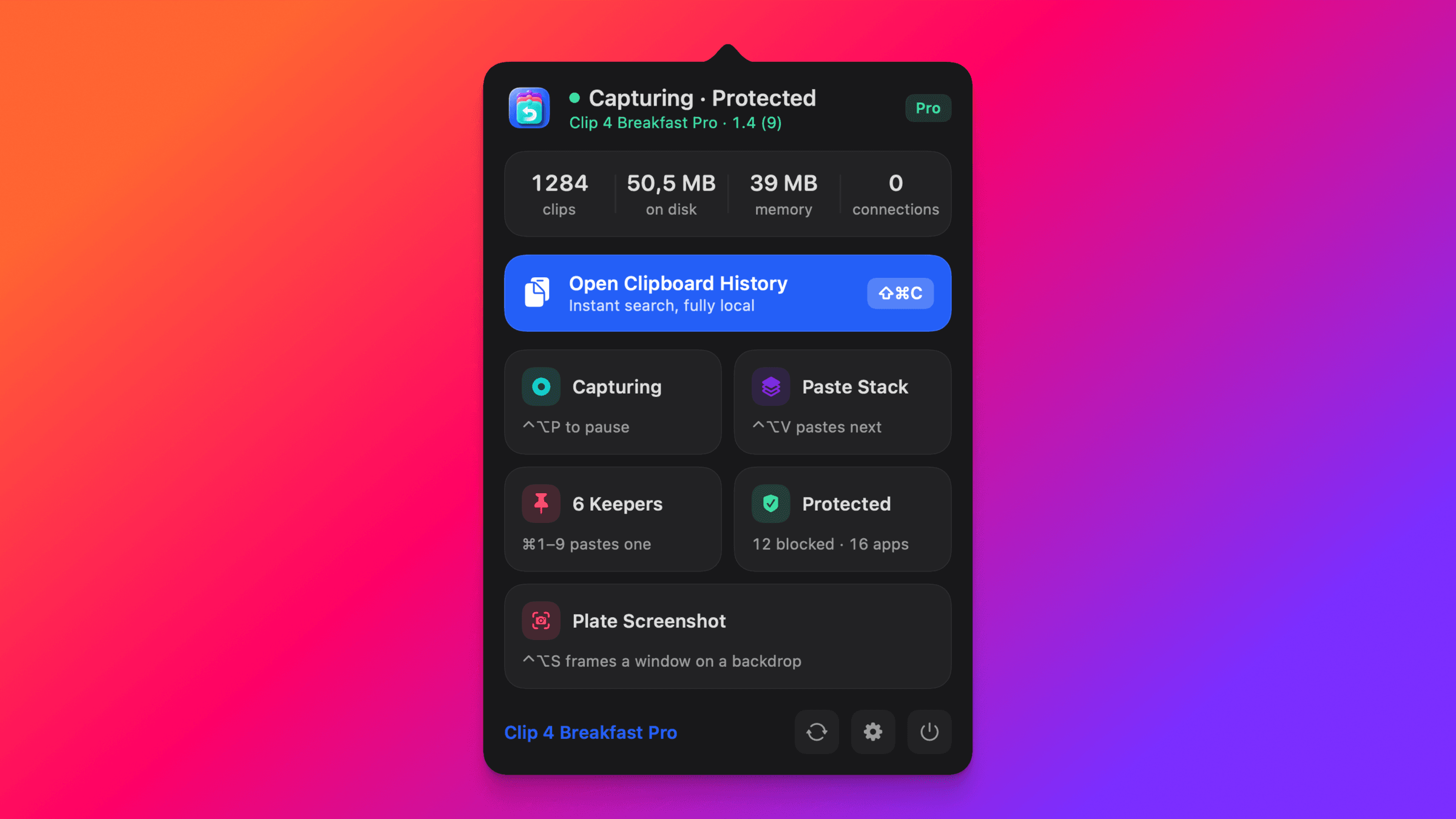
Press one shortcut, click a window, and the capture lands on your clipboard already framed on a designed backdrop. Every other product in the table hands you a raw PNG and a second app to buy.
Six buying decisions
Four product shapes. Six outcomes. No winner score and no invented missing features.
| Decision | Clip 4 Breakfast | Maccy | Raycast Clipboard History | Paste |
|---|---|---|---|---|
| From recall to deliveryHow far does the product carry copied work? | Recall → Keep → Transform → Deliver | Recall | Recall plus suite commands | Recall, organize, and share |
| Reusable workCan useful material become an intentional working set? | Named Keepers and Context Packs | History focused | Pinned items | Pinboards |
| Prepared deliveryCan clips be reviewed, transformed, and delivered in order? | Paste Stack, Safe Paste, and Paste As | Not stated in reviewed source | Edit and format options | Multi-item paste and formatting |
| Presentable screenshotsCan a captured window be shared without opening a second app? | One shortcut, plated on a designed backdrop | Not offered | Not offered | Not offered |
| Visible boundariesCan the buyer inspect retention and resource policy? | Visible history, payload, image-storage, and resource limits | Not stated in reviewed source | 3 months Free, unlimited Pro | Configurable history retention |
| Product shapeWhat kind of Mac product is it? | Focused native Mac command center | Focused history utility | Broader productivity suite | Apple-device clipboard library |
People who move copied material through repeatable, keyboard-first workflows.
People who want a minimal, fast, open-source clipboard history.
People who want clipboard history inside a broad productivity launcher.
People who want a visual clipboard library shared across Apple devices.
Proof you can inspect
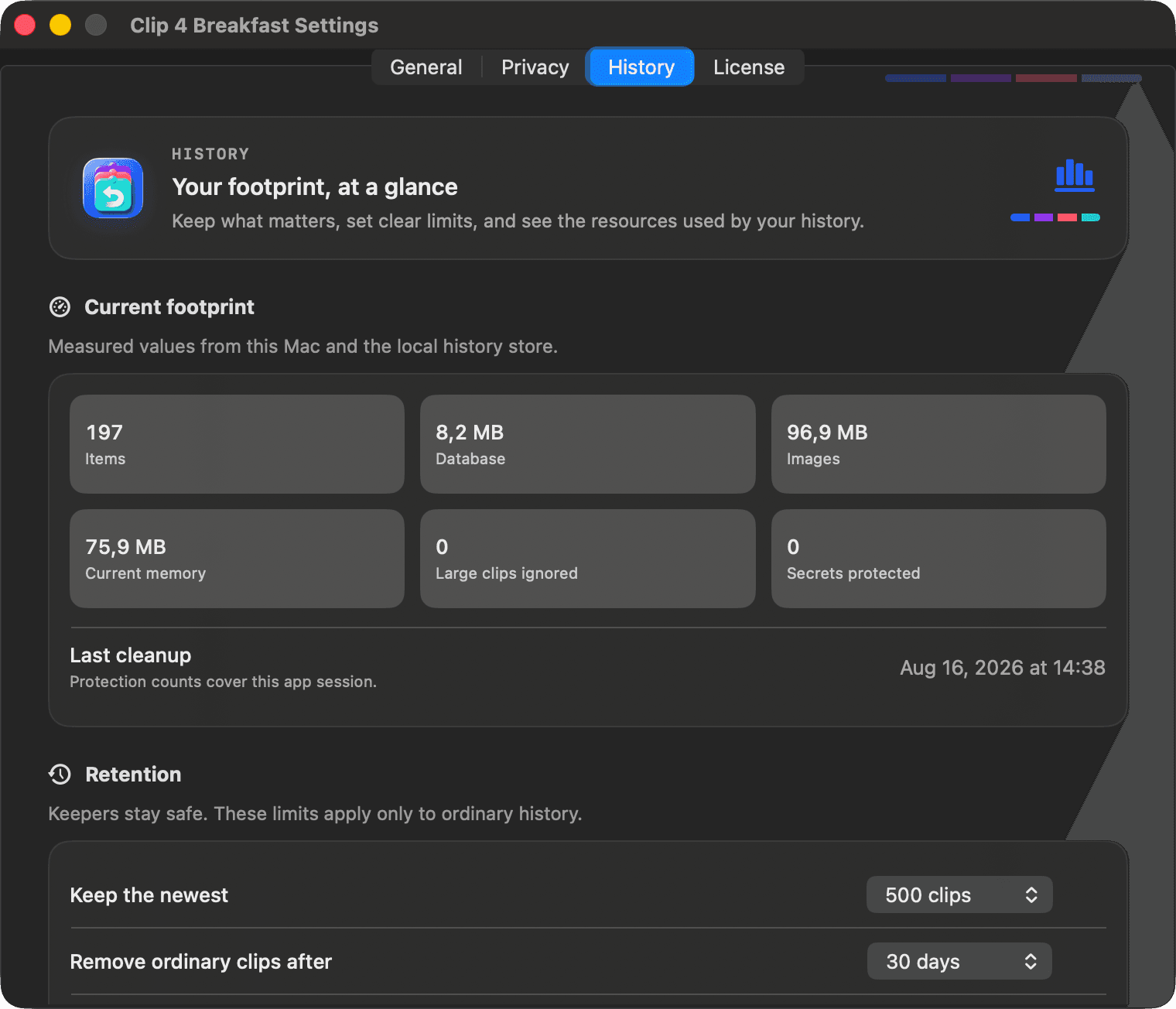
C4B shows current memory, history count and database size, managed image storage, cleanup state, and configured limits inside the app.
Live values from this Mac and this session. Captured 16 August 2026 from the shipped 1.0 release. Results vary by Mac, history, and session.
Other strong fits
These products remain part of the maintained guide without crowding the primary buying decision.
People who want a focused, local Mac clipboard with searchable history, favorites, and serial paste.
Why it fits. A mature, keyboard-friendly Mac clipboard with searchable history, iCloud-synced favorites, serial paste, and a one-time in-app unlock.
Why C4B may fit better. CopyLess keeps a searchable history and favorites well, and preserves rich clippings. Choose C4B when those clips should also become named Keepers, a temporary Paste Stack that clears on quit, one-shot Paste As transforms beyond plain text, and redaction review before a paste leaves. C4B also keeps a copied graphic on disk with only a thumbnail resident, so a history of heavy PDF and vector artwork never grows the app in memory.
People who need recent clipboard recall and want to start with the capability built into macOS Tahoe.
Why it fits. Spotlight can browse and search recently copied text, images, links, and files, then copy an item for reuse.
Why C4B may fit better. Choose C4B when recall also needs named reusable clips, temporary sequencing, one-shot transforms, and explicit retention controls.
People who want a feature-rich universal clipboard across Mac, iPhone, and iPad.
Why it fits. Native AppKit, collections, a paste stack, rich content handling, and optional iCloud sync in a one-time purchase.
Why C4B may fit better. Choose C4B for a more constrained Mac workflow, a dedicated named Keeper model, one-shot transforms, and visible resource policy.
Power users who already build their Mac workflow around Alfred Powerpack.
Why it fits. Searchable history connects to snippets, text expansion, clipboard merging, and programmable workflows.
Why C4B may fit better. Choose C4B when you want the advanced clipboard workflow already composed, without building or maintaining launcher workflows.
People who want deep filters, custom pasteboards, and sequential pasting.
Why it fits. A mature command-copy-paste workflow with custom filters, pasteboards, rich search, and sequential paste.
Why C4B may fit better. Choose C4B for a modern local-only command center with bounded persistence, Named Keepers, and a temporary stack that clears on quit.
Methodology
Reviewed 14 August 2026. Competitor capabilities and purchase models come from the official pages linked in this guide. Clip 4 Breakfast claims come from dated native evidence and remain release-gated.
Not stated means the reviewed official source did not make the capability clear. It does not prove that the product cannot do it. Prices and capabilities can change, so verify the linked source before purchasing.
The footprint chapter shows C4B's own dated app evidence. It does not claim a controlled competitor benchmark.
Built for the paste after the paste
Take the full workflow into your own macOS setup and decide with the evidence in front of you.